
 Download free for Windows
 View on GitHub
Visualize disk usage
The interactive treemap shows how storage is distributed across folders. View the same scan as a table or expand the folder tree to explore further.

SpaceTrace · Disk space analyzer
Which folders take up the most space? SpaceTrace maps your disk usage with an interactive treemap, a folder table and an expandable tree view. Explore your PC, accessible network shares and Windows or Linux devices over SSH from one Windows application.
Open source · Version 0.2.0 · Windows 11 x64 · Installs for the current user. The current development build is not digitally signed by the publisher.
Understand your storage
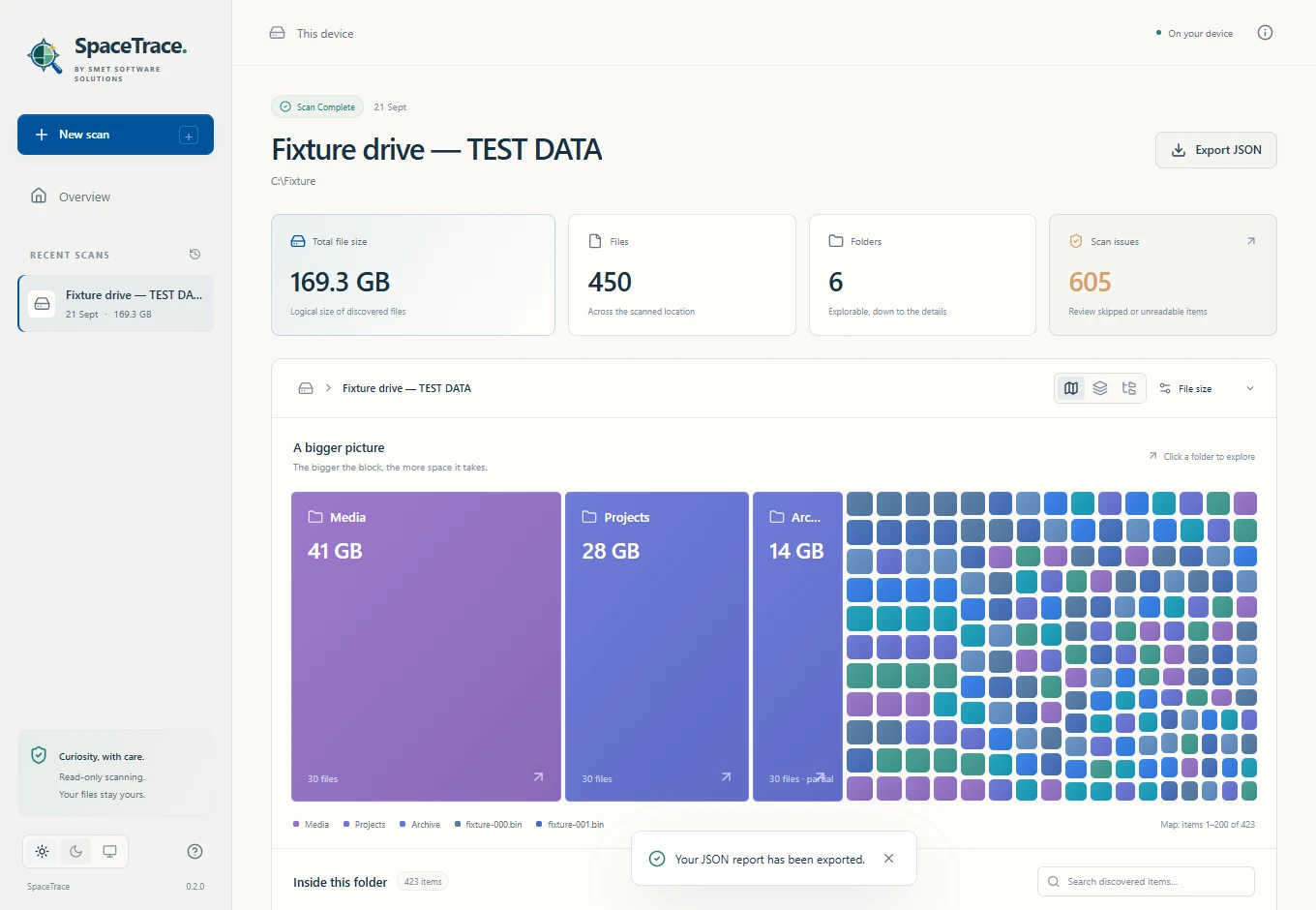
The interactive treemap shows how storage is distributed across folders. View the same scan as a table or expand the folder tree to explore further.
Switch between logical file size and allocated disk space, where available. Inspect file details and copy a path to find the right location.
Reopen saved reports on your computer or export a scan to JSON. Inaccessible folders and other scan issues remain visible in the report.
Three ways to scan
Choose a readable folder or drive on your Windows PC. SpaceTrace scans ordinary directories and skips symbolic links and junctions.
Scan an accessible shared folder using a UNC path such as \\server\share, or select a mapped network drive. Your existing Windows permissions apply.
Connect to a device over SSH using key authentication. Verify the host fingerprint on your first connection, then choose the folder you want to explore.
SSH scans require the Windows OpenSSH Client on your PC and an SSH server on the target device. Linux targets need Python 3.7 or later; Windows targets need Windows PowerShell 5.1 or later. This release supports key authentication through an SSH agent or a private-key file, but does not support password sign-in.
Download & installation
Download the free Windows 11 x64 installer. This is a development build that is not yet digitally signed by the publisher.
Run the installer. If the WebView2 Runtime is missing, it is downloaded during installation; an internet connection is needed for that step.
Open SpaceTrace, select your PC, a network share or an SSH device, and choose the folder where the scan should start.
Select Start scan and explore the folders it finds. You can cancel a scan and keep the results already discovered.
Your data, your overview
SpaceTrace examines file metadata to map disk usage. It does not read file contents for classification, delete files or move them.
Scanning uses your account's permissions. Unreadable or skipped content is reported, so you can see when the results are incomplete.
SpaceTrace saves reports in its local application-data folder. There is no cloud account, telemetry or upload service. SSH scans retrieve metadata over your authenticated connection.
A JSON export contains paths and scan metadata. You decide whether to share that information.
Frequently asked questions
Yes. SpaceTrace is free and open source under the MIT licence. Our other solutions, Dolly Paste and MailHarbor, are open source too.
The desktop download is for Windows 11 x64. From the Windows application, you can also scan Linux and Windows devices over SSH. No Linux or macOS installer is available here.
No. SpaceTrace shows which files and folders use storage. It does not delete or move anything; you decide what to do with the information.
A folder scan cannot fully account for unreadable files, reserved space, snapshots or filesystem overhead. SpaceTrace reports scan issues and shows missing measurements as unavailable.
What we believe
Software improves when knowledge can be shared. That is why all three of our own solutions are open source: SpaceTrace, Dolly Paste for local clipboard history and MailHarbor for email and documents.
These applications make everyday tasks easier to manage. We bring the same attention to your workflow when we build custom software.
From understanding your data to an application for an everyday workflow, we build software that fits your organization and existing systems.
Discuss your software needs